Make the content.
Fill the calendar.
Know what worked.
SupahPost is a content studio, scheduler, and analytics workspace for people who run social accounts at volume. The AI makes the post, a real editor lets you fix it, the calendar sends it out, and the analytics tell you which ones to make again.
No card. We'll email you.
- AI + a real editor
- One calendar
- Analytics that answer questions
- Bring your own brand
S1 — hero
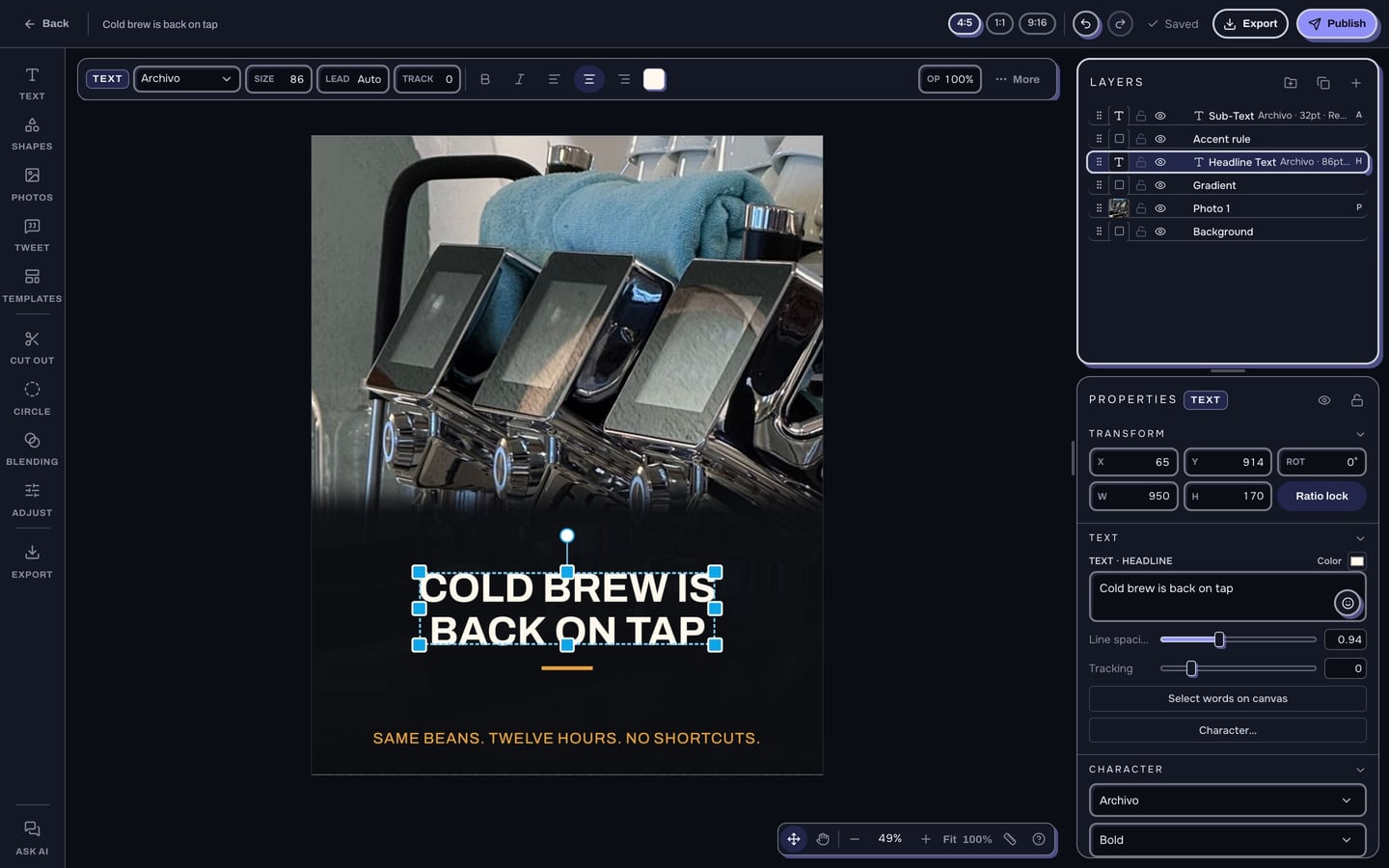
Create tab, mid-edit: a generated graphic with the layered editor open over it, layer panel visible.
TODO — real captureThe problem
Stop duct-taping five tools together.
A browser for finding source material. An image editor. A video editor. A scheduler that knows nothing about either. And your analytics in a sixth tab, disconnected from the thing that made the post.
SupahPost is one workspace for all of it. Make the post, put it on the calendar, and see what it did, without exporting anything.
Make
Make a month of content in an afternoon.
-
It finds.
Point it at what is working in your niche, or paste a link.
-
It writes.
Captions in your voice, learned from posts you have already published.
-
It designs.
A finished graphic, in your template, ready to go out.
Paste an X or Facebook link and get a finished tweet-screenshot composite. Describe a topic and get a graphic. Drop in a list and get the whole batch.
S2 — the machine
A link pasted in, the engine's steps running, the finished graphic at the end.
TODO — real captureThen fix the part it got wrong.
Because it will get something wrong. That is what AI does. The crop is off, the headline breaks over three lines, the photo is the wrong one.
Most automation tools give you a finished image and a re-run button. Your only move is to roll again and hope, or go rebuild the thing that made it.
Here, the post opens. Actual layers, blend modes, PSD in and out. Move the photo, retype the headline, swap the background, and put it on the calendar. Nothing is flattened and nothing gets redone somewhere else.
Generation on its own is a slot machine. An editor on its own is Canva, and you already have Canva.
S3 — the fix
Layered editor: layer panel, blend modes, a headline being retyped on the canvas.
TODO — real capture- And a real video editor. A timeline with keyframes, markers, split and speed. Cut a clip, size it for the feed, send it to the calendar — without opening CapCut.
- It works in your brand, not its own. Import your templates as PSDs, bring your colors and fonts, point it at posts you have already made, and it builds in that look.
S4 — video editor
Timeline with clips, keyframes and markers. Silent looping screencast, not a still (§4.4-2).
TODO — real captureNo card. We'll email you.
Any niche
Any niche.
Food, finance, fitness, news, music, travel, parenting — whatever your page is about. There is no built-in subject and no house style. It learns the look and the voice from posts you have already published, so it builds your content rather than a generic version of it.
What it is not is niche-agnostic about where the post goes: SupahPost publishes to Facebook Pages and Instagram accounts. Two platforms, done properly. The full version of that boundary is a few sections down, in Schedule.
See
Numbers you can ask questions.
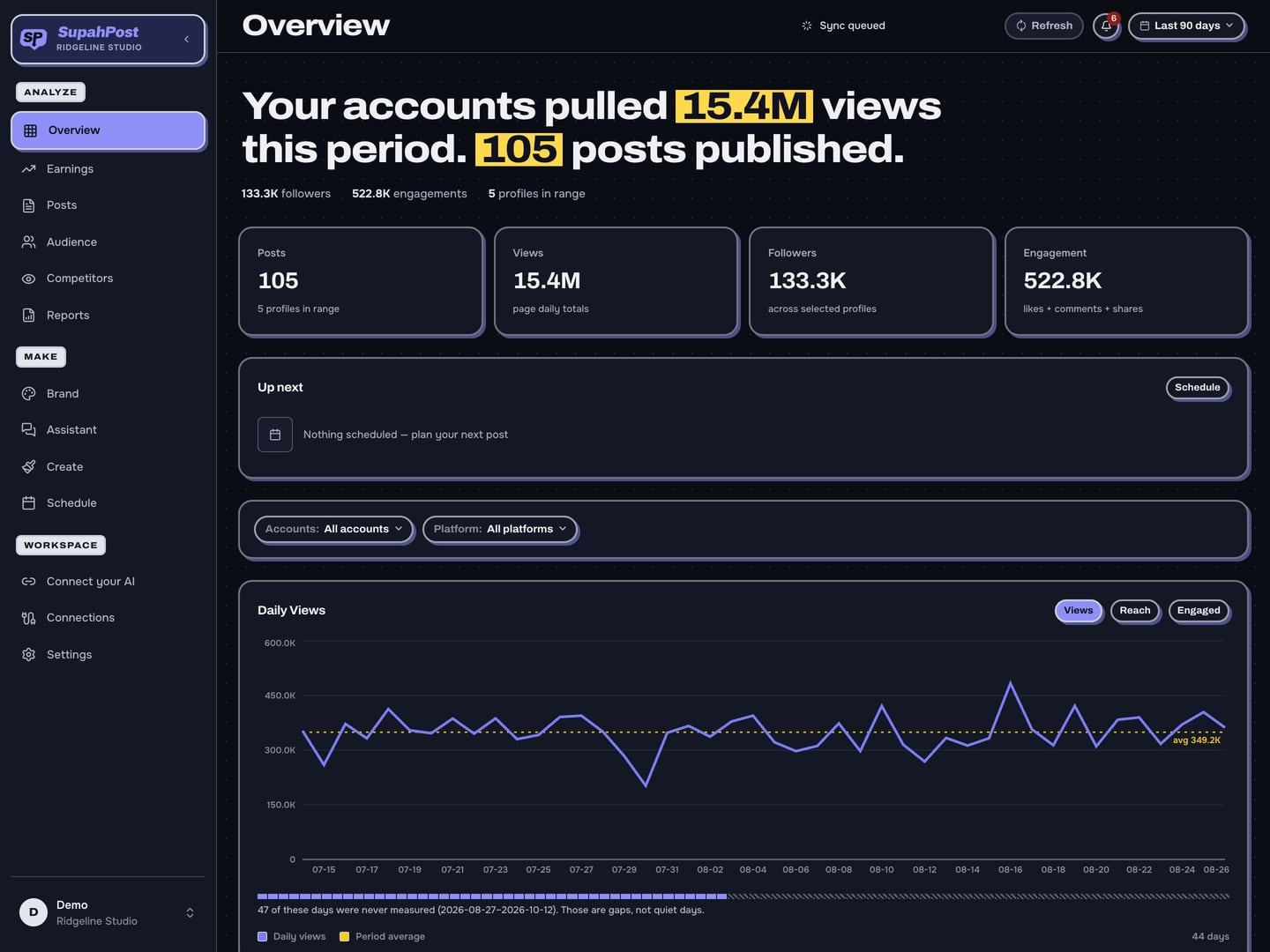
Views, engagement, followers, where your audience is and when they show up — across every account you run, in one place.
Then stop reading charts. Ask: which posts did best last month, and what did they have in common? The built-in assistant answers from your own data, and so does any AI you already use — see below.
Every post you have ever run stays searchable — captions and the text the platform reads out of your images — so you can pull up everything you posted about a given person, product or topic and see how it did.
If your Facebook page is in Meta's Content Monetization Program, SupahPost also pulls per-post earnings from Meta and works out the rate per thousand views for you. Not in the program? Everything else works the same; the dollar column is just empty.
S5 — overview
Multi-account overview: views, engagement and follower series side by side.
TODO — real captureS6 — earnings
Earnings table with RPM (est.). Ships labelled sample data.
TODO — real captureNo card. We'll email you.
Connect your AI
Your AI, pointed at your own workspace.
Plenty of tools connect to an AI now. Most of them hand it a publishing queue. This one hands it your performance data, the text inside your images, your photo library, and the tools to make the next graphic.
- "Which of my posts did best last month, and what did they have in common?"
- "Take my five newest drafts and spread them across tomorrow morning, 15 minutes apart."
- "Find my three best posts from last month, then make a new graphic on the same theme."
31 tools, one endpoint, one command to connect.
You decide what it may do. Read looks and never touches. Schedule can fill your calendar but cannot post right now. Publish can put a post in front of your audience, and has to show you a preview and ask again first.
Revoke the key any time; every call is logged.
S8 — connect Claude
Settings › Connect Claude: the token, the permission tiers, the audit log.
TODO — real captureS7 — calendar
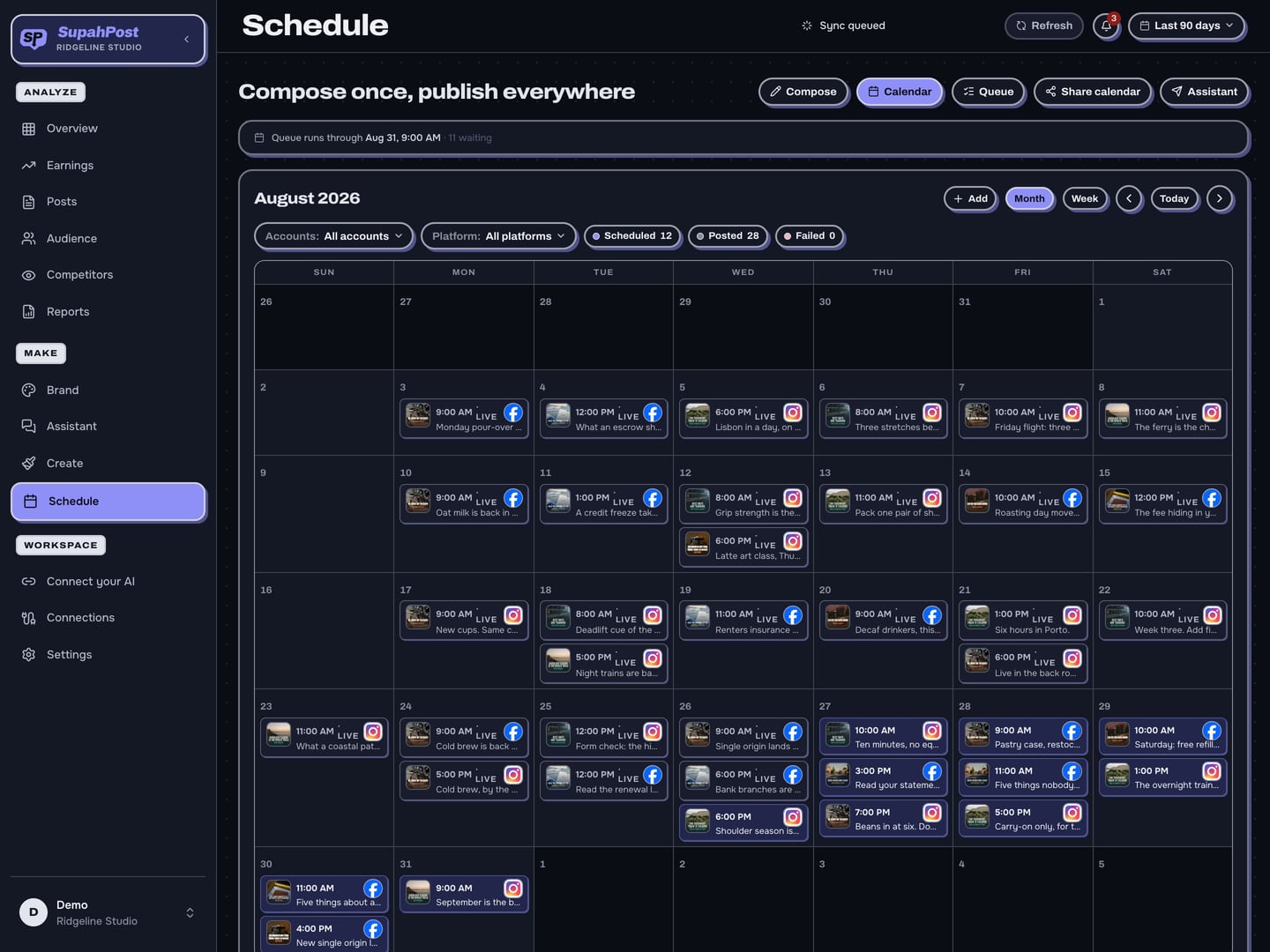
Week view with posts across several accounts, one being dragged to a new slot.
TODO — real captureFill
One calendar. Every account. Nothing posts by accident.
Drag posts onto the calendar or let SupahPost take the next open slot. Per-account posting times, learned from what each account's own audience actually did — not a generic best-time chart.
Different caption per platform. First comment scheduled with the post. Carousels and batches in one pass. Posts that qualify are handed to Facebook's own scheduler, so they go out whether or not your laptop is open.
Publishing is Facebook and Instagram.
Those are the two we do properly, with real page tokens and real error reporting when something gets rejected. We would rather do two platforms correctly than list six.
See it run
Pick a prompt. Watch it work.
Four starting points, four recorded runs. Each one ends the same way: the finished post opens in the editor and something gets fixed before it goes out.
Frame slot
The recorded run plays here.
awaiting captured framesStep 1
The starting point goes in — a link, a topic, a list, or a clip.
Step 2
It finds the source material, writes the caption, and designs the graphic in your template.
Step 3
The finished post opens in the editor with real layers, and the part it got wrong is fixed.
A real run, recorded. The live one is behind the login.
No card. We'll email you.
Examples
What comes out.
Every page in this category shows you its own product. Almost none of them shows you what the product makes. These are outputs — each one captioned with the input that made it, not with what it turned into, because the input is what makes the output mean anything.
A spread of subjects on purpose: food, finance, fitness, news, music, travel. There is no house niche here and the gallery should not read like there is.
Slot 1
awaiting owner pickSlot 2
awaiting owner pickSlot 3
awaiting owner pickSlot 4
awaiting owner pickSlot 5
awaiting owner pickSlot 6
awaiting owner pickWhy this exists
i run social accounts at volume. not one polished post a week — a lot of posts, every day, across several accounts, for years.
making that content meant four apps and a spreadsheet: a browser full of tabs for source material, one app to build the image, another to cut video, a scheduler that knew nothing about either, and the platform's own analytics in a sixth tab telling me what happened two days ago.
i tried the tools everyone recommends. they are built for a brand posting a few times a week. several of them charge per connected account, which stops making sense the moment you run more than a couple.
so i built this one, for me, and i have been running my accounts on it every day since. every feature here exists because i needed it on some specific afternoon.
— nate
Pricing
Flat plans. No per-seat billing.
Most tools in this category bill per connected account or per seat. Connect eight accounts and you pay eight times, for one calendar.
SupahPost is a flat monthly subscription that covers the platform and a working allotment of everything you do day to day — making posts, scheduling, and analytics.
Flat, not per-channel. Buffer bills from $5–6 per channel per month and Publer from $5 per social account per month, so the bill scales with how many accounts you run rather than with how much you use it. SupahPost is one subscription whatever you connect. Buffer and Publer pricing last checked 2026-08-25.
What costs real money, and what doesn't
- Free, however often you do it. Reading your own data. Analytics, search, and reports are in the subscription — you are never billed for looking at numbers you already have.
- Included in the plan. Making graphics, scheduling, publishing, and the day-to-day AI that writes captions and reads the text out of your images.
- Comes out of credits. Generating original images with AI, back-filling years of your own posting history, and very heavy analysis. These cost us real money every time they run, so people who use them pay for them and people who do not are not quietly subsidising them.
Final pricing lands when SupahPost opens generally. Early-access operators get it first, and get to argue with it.
FAQ
Questions people actually ask.
What is SupahPost?
SupahPost is a content studio, scheduler, and analytics workspace for people who run social accounts at volume. It generates finished graphics, carousels, tweet-screenshot composites and video; it schedules and publishes them to Facebook Pages and Instagram accounts; and it reports what each post did, including per-post earnings for Facebook pages in Meta's Content Monetization Program.
What does SupahPost actually make?
Finished graphics on your own templates, multi-slide carousels, tweet-screenshot composites built from an X or Facebook link, and edited video. Paste a link and get a composite. Describe a topic and get a graphic. Drop in a list and get the whole batch in one pass.
What if the AI gets it wrong?
It will get something wrong — the crop is off, the headline breaks over three lines, the photo is the wrong one. Most tools give you a finished image and a re-run button, so your only move is to roll again. Here the post opens in a real editor: actual layers, blend modes, PSD import and export, a cutout tool, and a video timeline with keyframes, markers, split and speed. You fix the part that's wrong and the fixed version is the one that goes out.
Does this only work for one kind of page?
No. Food, finance, fitness, news, music, travel — it learns the look and the voice from posts you have already published, so it builds in your style rather than a generic one. Import your own templates as PSD files, bring your colors and fonts, and point it at your own reference posts.
Which platforms can SupahPost publish to?
Facebook Pages and Instagram accounts. Two platforms, done properly, with real page tokens and real error reporting when a post is rejected. We would rather do two correctly than list six. Last checked 2026-08-25.
Will my posts get less reach if I schedule them through SupahPost?
No. Posts published through the API reach the same audience as posts made in the app. There is one real failure mode worth knowing about: while a Facebook app is still in development mode, its API posts only reach people with a role on the app, which looks exactly like a reach collapse. SupahPost's Meta app is Live, so this does not apply.
Do I have to give SupahPost my social media passwords?
No. You connect through Facebook's own login. SupahPost never sees a password, and every token it holds is encrypted at rest. You can revoke access from Facebook at any time.
Can I connect Claude or another AI to my workspace?
Yes. SupahPost runs a hosted MCP endpoint with 31 tools, connected with one command. Most tools that connect to an AI hand it a publishing queue; this one hands it your performance data, the text inside your images, your photo library, and the tools to make the next graphic. You choose the scope: Read looks and never touches, Schedule can fill your calendar but cannot post right now, Publish can put a post in front of your audience and has to show you a preview and ask again first. Revoke the key any time; every call is logged.
Does SupahPost show what my posts earned?
For Facebook pages in Meta's Content Monetization Program, yes — SupahPost pulls per-post earnings from Meta and works out the rate per thousand views for you, shown as RPM (est.) because that rate is calculated by SupahPost, not reported by Meta. If your page is not in the program the dollar column is simply empty and everything else works the same.
What does SupahPost cost?
Pricing lands when SupahPost opens generally. The model is decided: a flat monthly subscription — not per seat and not per connected account, which is how most tools in this category bill — covering the platform and a working allotment of everyday use, plus credits for the few actions that cost real money every time they run, such as generating original images with AI or back-filling years of posting history. You are never billed for reading your own data.
Make it. Post it. Do it again tomorrow.
SupahPost is opening to a small group of operators first. Tell us what you run and we will get you in.